
Products

Users are able to edit the patient information in Prof. SUNI software.
Here is how to edit patient info:
1. Select Patient tab -> then select Edit Patient.
&n..
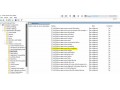
No camera acces
Open gpedit.msc
Select
Computer Configuration>Administrative Templates>Windows Components>App Privacy>
Double click “Let Windo..

Ran across the referenced error this week and the issue it posed was when the user would try to launch the DentalEye software, the software would not open rather give a couple database connection erro..
1. Select System -> then Preferences:
2. On the Preferences window, Click the Advanced button at the bottom:
3. Click the C..

***If using the EZDent-i software as a standalone software;
when attempting to search for a patient either by chart number or patient name it is possible to receive a pop-up box that reads&nbs..
EZDent-I VTPATCH manager is an application found within the EZDent-i folder.
This application can help with correcting any issues found in the system and performs a debugging of the software.&..
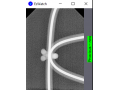
Within the newer model DrsRay X-ray sensors, there is application called EZWatch that appears on the right bottom of screen and displays X-ray images that are taken.
The app normally defaults to ex..

1. Select Options:
2. Select Setup:
3. Select the Display Settings tab:
4. Switch to preferred monitor by clicking the ..
Retaking an X-ray within EZdent-i software can bring about an issue for the user as there is no retake button or instruction for how to do so within the software interface...
Please see the steps b..

1. If you get this message when trying to use the camera, please follow the steps below.
2. Options > User Interface
3. Toolbar > Customize buttons > Camera ..
-100x100.jpg "Dr's Light Pro..")